Showing posts with label images. Show all posts

Friday, 25 April 2025

Using AI to create images for blog posts - an update

A couple of years ago I wrote a blog post about using AI to generate images for blog posts. I had forgotten about it until recently, when I suddenly started getting lots of spam comments on it. It must have ended up being favoured by search engines for some reason!

Things have really moved on when it comes to AI and image generation since I wrote that post. You can now use ChatGPT to generate images, although there is a limit to the number that you can create in a day using a free account - I think it's officially three although I managed to make five in one session.

I was thinking about how much I'm looking forward to sitting in our newly landscaped garden with a book, so I decided to ask it to generate me an image which would be a suitable illustration for a blog post on that subject. And yes I know, being polite to ChatGPT makes it cost more...I just can't help myself!)

My prompts are in italics.

The blog post is about how I'm looking forward to reading in my new garden. I want a landscape image in a photographic style. No text in the image. The image should be of a lovely new garden with clean fencing, patio etc. There should be a comfortable chair which is suitable for using outdoors with lots of cushions, then a small table next to it with a pile of books, a blanket and a hot drink in a mug. No people in the picture.

AI generated image of a chair in a new garden with a pile of books

I was really pleased with this result! The garden looks fairly realistic, the chair and table aren't bad (I think the table might be missing a leg but it's not too obvious) and the pile of books is pretty good without any attempt at text on the spines.

I decided to amend the image to portray a more realistic British summer:

That's perfect! Now can you create the same image but it's raining?

AI generated image of a garden with a chair in the rain

Again it's not bad! It's a little dark, but it's clearly raining. So I decided to cheer things up a bit. I was interested to see whether asking for changes would make them to my first image or to the amended image.

Thank you! Now can you make it a little more colourful, make the blanket striped and add some colourful cushions, make the mug blue 

AI generated image of books and a chair in a bright garden but it's raining

It changed the second image which was what I was expecting. This image is probably my least favourite from the set because the colours are just too bright. But I wanted to see what it would look like on a nicer day.

Can you make it sunny again in the image?

AI generated image of a chair in the garden for a blog post

This image is so colourful that I think it does look very fake. A leg is now visible on the table though, and it's interesting how the length of the blanket has changed. So I wanted something a little more subtle...

Thank you! Can you tone down the colours a little, make them pastel shades


Although I like the colour scheme for this image a lot more, I do feel that the further I went with amending the image the more fake it looks. This time it has randomly added some extras - I quite like the paints on the table and the open book but you don't typically find decorative globes in a garden, and certainly not two of them! And where did the suitcase come from?!

The quality of the images is definitely an improvement on the ones that I created two years ago. I would happily use the first image in a blog post, and I think that it could easily pass for a real image, especially when scrolling quickly. 

I'm starting to notice images like this more and more, both on social media and on business webpages, and I know that it won't be long at all before it's impossible to identify an artificially generated image. It's really important to be aware that you can't trust anything you see!

Wednesday, 10 May 2023

Using AI to generate images for blog posts

Since I wrote this post, AI technology has been improving at a startling rate. I recently wrote a follow up blog post here - Using AI to create images for blog posts - an update.

I've been doing a lot of reading around Artificial Intelligence recently, it's a subject which fascinates me. As well as the ethics of AI, as both an online content creator and consumer I'm concerned with how AI could be used to produce content which is indistinguishable from that produced by humans. I've played around with ChatGPT to both generate blog post titles and to see what posts it would write based on those titles, and I've been impressed and I must admit a little bit in awe.  

When I'm looking for an image to illustrate a blog post then I turn to Unsplash for good quality and copyright free photographs that work with my content. The other day I was struggling to find exactly what I wanted, and I remembered reading about the AI image generator Stable Diffusion. I gave it a go and was actually really impressed with the image of a packed suitcase that it generated (the post is to be published next week, the AI image will be clearly disclosed!) so I thought I'd have a go at generating some 'stock' photographs that I could use to illustrate the sorts of things that I often write about!

I started with some crafty requests - bullet journals, art journals and a crochet blanket - and I was pleasantly surprised with the results. The text in the journals is nonsense and the blanket is a little fuzzy, but as part of a quickly skimmed blog post I think that they could pass as real photographs.

AI generated images of craft projects

I soon discovered that anything involving text or body parts like faces or hands doesn't work well at all, and I ended up with some very creepy images. I was impressed that the tool managed the word 'blog' on the laptop, but all the hands have gone very wrong!

Bad AI generated images for a blog post

I found that the AI image generator coped much better with images that involved a landscape or food. The images are a little too perfect, very smooth and shiny, but I think that some of them could certainly pass as genuine photos when scrolling through a platform like Instagram!

AI generated photographs to illustrate a blog post

My favourite AI generated images were these two involving books. It took a few attempts because the tool can't manage text very well so I needed to try for images taken from a distance or a little out of focus. I think that either of these two images would make a great blog post photograph, as long as you don't look too closely!

AI generated images of books and bookshelves for a blog post on reading

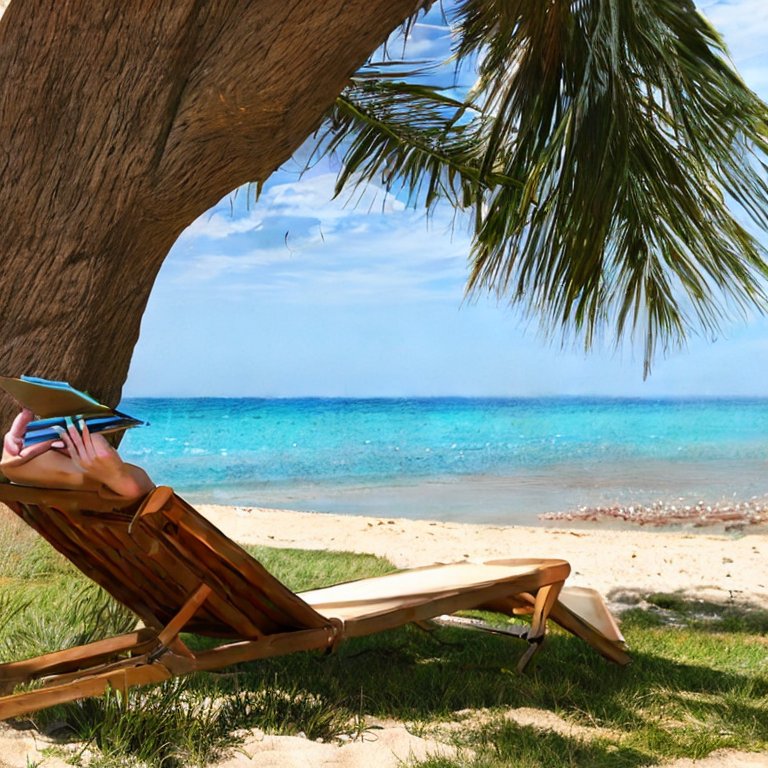
Finally one of my favourite images was one that went completely wrong. I asked for a person sitting on a sun lounger at the beach reading a book and ended up with this disturbing image!

Bad AI picture of someone reading a book on the beach

Clearly the technology has a way to go, but I can see that it won't be long before it will be easy to generate the exact image that you are looking for to illustrate something online, especially if you are just looking for generic images. I'll be looking very carefully at photographs now, because I've started to identify the characteristics that you can look for to identify an AI image. For example differences in the textures, wobbly edges, wonky text, over saturated colours and sometimes a rather grainy feel.

I found it fascinating to play with this tool, and if you have a spare few minutes I'd recommend giving it a go, you might be surprised with how well it works! 

All these images were generated using Stable Diffusion which is currently free to use. All images created using Stable Diffusion Online are fully open source, explicitly falling under the CC0 1.0 Universal Public Domain Dedication.

Friday, 21 July 2017

What Photobucket did to my blog

Photobucket and what it did to my blog

When I started this blog way back in 2011 I didn't know what I was doing. I wanted photos, so I uploaded photos directly through Blogger. I didn't think to resize images, I uploaded them directly from my digital camera. The pictures were enormous, and I quickly filled up my Blogger Picasa storage. I looked for an alternative, and discovered that many bloggers were using Photobucket. It seemed like the perfect option -  it was free, and it came reliably recommended.

After a couple of years my blog traffic increased, I reached the bandwidth limit on the free Photobucket account and my photos stopped displaying. After a bit of research I was happy to pay $29.99 for a yearly subscription package with Photobucket that came with an increased level of storage and unlimited bandwidth. And this carried on quite happily for a few more years until this summer.

Then at the end of June, Photobucket suddenly announced that it would no longer allow third party linking (aka hot linking) of images unless you upgraded to a higher level account - at a cost of $399 for the year. Well I say they announced it, they didn't notify me directly. I heard about it from a blogging friend and I've still had no official direct communication. The sudden change seemed to affect people in different ways, and those using a free account lost their images immediately. Fortunately I've been unaffected so far, but with my annual subscription due for renewal on the 12th August I knew that I had to act quickly.

Photobucket removal of third party linking on my blog

Paying $399 a year to host my images just isn't going to happen. I looked around and found that over the last few years Google have increased their free storage, and even the lowest subscription tier is a cheaper option than Photobucket. I made the decision to jump ship and transfer over all my images. Of course this is something much easier said than done - I had over 4000 images hosted on Photobucket linked to more than 1300 blog posts on Blogger. Even at the rate of five minutes per blog post that is an enormous amount of work.

Of course this all coincided with the beginning of the summer holidays, meaning that all this work now has to be fitted around entertaining the children during the day. I've spent hours and hours uploading and re-linking images whenever I get a chance, working late into the evenings, and I'm barely a quarter of the way through. I've cancelled my recurring Photobucket subscription so it's a race against time to update as many posts as I can before the 12th August - please bear with me if I don't manage it in time! Fortunately I have the majority of my photos backed up elsewhere under a reasonably logical filing system, others aren't so lucky.

At the beginning of the process it felt like an insurmountable challenge. I became quite disheartened, and you might have noticed the lack of new posts over the last couple of weeks - I've either been too busy updating photos or simply not had the motivation. But even though I have now only completed a quarter of my blog posts I feel like I've at least broken the back of it - I've updated most of my popular and seasonal posts, and those that are left are ones that can wait a while for new images.

On the plus side, it has given me a long overdue push to give my blog a good sort out. 1300 blog posts is a great deal, and there are many old posts that are now either outdated or just irrelevant. I've had a mass delete of old posts - over a hundred have gone and I have another hundred or so that I'm still thinking about. I've deleted reviews for products that are no longer available, previews for events that are long gone, and random posts that were just a couple of sentences. I'm even thinking about sorting out some of my 'in progress' craft posts and putting them all together into one post. I'm not absolutely sure that deleting posts is the best thing to do for a blog, but it makes me and my blog feel lighter for having done so!

I've also removed and updated masses of broken links. I run a regular broken link check, but because there are so many blog posts the free online checker doesn't find them all, especially from older posts. I've checked every single link in my blog posts so far and have found many that no longer work. I've also found a few where the original domain has expired and the link now directs readers elsewhere - something that a broken link checker won't pick up.

It's given me a push to think about the type of content that I'm publishing. I want my blog posts to be useful, interesting and informative, not just written for the sake of filling up my editorial calendar. So hopefully that's a change that I can make going forwards!

The big lesson for me here of course - don't put all your eggs in one basket, and don't assume that just because you are paying for a service it will continue indefinitely!

If you've been having problems with Photobucket and your blog then you might find this post helpful - What's going on with Photobucket? Info for Bloggers

Were you affected by the changes to Photobucket? How are you coping with it?