
Friday, 28 April 2023

Trialling a DisneyBand+ (MagicBand+) on the Disney Wish cruise ship

At the beginning of April we read that Disney Cruise Line would be trialling the use of the DisneyBand+ on selected Disney Wish sailings. This was really interesting for us, as we bought the children a MagicBand+ each to use in the Disney World theme parks last summer and loved using the technology in the parks. We were hoping that our cruise at Easter on the Disney Wish might be one of the selected sailings!

We happened to arrive early at the terminal, and my husband soon spotted a small table where they were looking for families to trial the new bands. He quickly signed us up, and so the four of us were able to take part in a special trial of the DisneyBand+ on this Disney Wish cruise. We were told that about 350 people on our cruise would be chosen. As a reward for visiting their stand and giving feedback during the cruise we were given the bands to keep, and also a Disney gift voucher which was an added bonus.

The DisneyBand+ uses the same technology as the MagicBand+ which is already in use at the parks, but Disney Cruise Line are calling it the DisneyBand+. As far as I understand, when it's all up and running the existing MagicBand+ bands will work in the same way so you won't need to buy new bands specifically for cruising, but I can't be completely sure on that. 

For context, we have now been on five Disney cruises and have been to the parks many times over the last few years. Our last visit to the parks in Orlando was in August last year, when we bought and used MagicBand+. I think we paid $34.99 each for our MagicBand+ (we used a voucher so I'm not quite sure!) and so I'd expect these bands to have a similar price point.

Disney Cruise Line branded DisneyBand+ MagicBand+

The bands are waterproof and sturdy, but as we have found with the MagicBand+ they do have a tendency to fall off. We added a hair tie to the strap which helped to keep them in place, and I'm sure that you can buy clips which will do the same job. The bands are rechargeable and need charging every few days, you can double tap the band for a light up indicator to check the charge level.

Our main use for the bands on this cruise was as a room door key, and this worked perfectly meaning that we didn't need to carry our Key to the World card around with us all day. We also used the bands to check in with photographers, and they could be used to purchase food and drinks around the ship. Another participant that we spoke to said that they had worked very well in the laundry. 

The bands don't replace the Key to the World card and you still need to show this when getting on and off the ship at ports. There are currently no extras for the bands at Castaway Cay (Disney's private island in the Bahamas) so there is little point taking them with you if your cruise stops there as you'll have your Key to the World card with you anyway which you can use for purchases and photographers. 

The only cruise specific extra thing that we noticed with the bands was during the pirate night show and fireworks, when the DisneyBand+ lit up in time with the music and in appropriate colours. There were a couple of other times when we thought we saw our bands light up, for example during a welcome show soon after we boarded, but it wasn't consistent.

There is currently nothing extra around the ship to use the bands for which was a slight disappointment as the children had a lot of fun using the bands at the park. At the parks there are statues which you can interact with by waving your band, and there are games that you can play, like the Bounty Hunter game at Star Wars: Galaxy's Edge. Something like this would work brilliantly on a cruise ship and I'm sure that there are plans afoot, but at the moment they weren't able to tell us if or when such things might be added. 
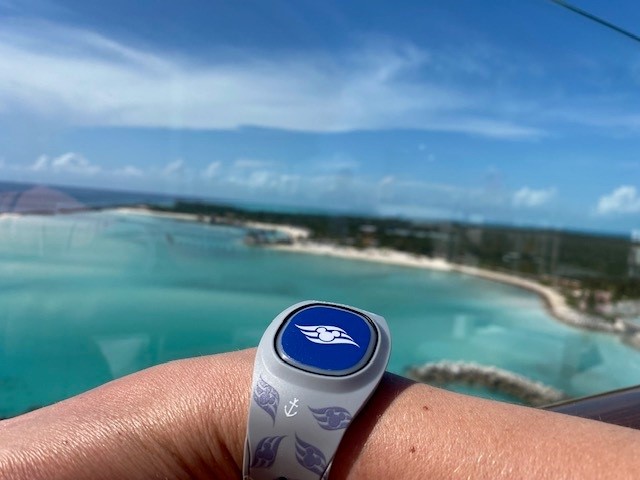
DisneyBand+ on a Disney cruise ship

We really enjoyed the opportunity to trial the bands and they were definitely an added convenience on the cruise. At the feedback session we were asked if we would buy bands specifically for the cruise, and the answer to that had to be no, as you don't get anything near the experience with them that you do in the parks. However the technology is exciting and there is a huge amount of potential, so I'm really interested to see where it goes in the future. Maybe by the time we can manage another Disney cruise there will be more exciting things to report back on!

Thursday, 27 April 2023

What parents need to know about e-safety

This is a guest post

Most parents are aware that the advantages of the Internet outweigh its disadvantages. Thanks to the Internet, kids now learn and accomplish more things. Survey shows that over 50% of parents allow their kids to have access to the Internet before they reach the age of 11. While it's true that the Internet can do more good than harm, the consequences of misusing the Internet can be devastating for kids. 

To ensure the safety of your kids online, you must teach them a few essential skills in the same way you taught them how to stay safe when crossing the street. Here's what parents need to know about e-safety.

Internet Safety Laws 

Parents must know about the Internet Safety Laws or the COPPA (Children's Online Privacy Protection Act). The law aims to protect kids younger than 13 when using the internet. It helps to prevent anyone from obtaining a child's personal information without the parent's consent.

COPPA obliges websites to explain their privacy policies and to obtain parental consent before collecting the child's personal information, like their names, phone numbers, addresses, and Social Security numbers. In addition, COPPA prohibits a website from requiring children to provide more personal information than necessary when playing a game or entering a contest online.

COPPA has several requirements. However, the key ones are that companies that produce websites, apps, and online tools for those below 13 years old must provide notice and acquire parental consent before they collect information from these users. In addition, they should have a clear and comprehensive privacy policy. More importantly, they must ensure that the information they collect from kids is kept confidential and secure.

Online Protection Tools 

Numerous online protection tools can help enhance children's safety when in the online world. Parents must be well aware of these tools for the benefit of their kids. Online tools allow parents control over their kids' access to the Internet, protecting them from adult materials and predators. 

Many Internet Service Providers are providing parent-control options. Parents can also acquire software and tools that can help block access to restricted sites and prevent personal information from being transmitted online. Many other programs can help monitor and keep track of your children's online activity. 

Password Management is one of those online protection tools that parents should know how to use. When using different websites and apps online, there might be a need to keep track of email addresses, usernames, and passwords. 

While it might be tempting to use similar usernames and passwords to make things easier and prevent getting locked out, it could easily compromise your login credentials. When this happens, cybercriminals will be able to have easy access to your children's online accounts. A password manager is an effective tool for keeping track of the numerous login credentials, ensuring the safety of your child's personal information.

Setting up Parental Controls 

Parental controls are some of the most effective tools parents can use to ensure the safety of their kids when using the Internet. These help prevent children from accessing unsuitable content. Sometimes, parental controls can be confusing for parents. Thus, partaking in online safeguarding training to learn more about the digital world and how to protect their kids may be a good idea. The training will also teach about parental controls.

There are three main types of control that parents should be aware of - network-level controls, device-level controls, and application controls. Network-level Controls are on the router or hub of the Internet. It applies to all devices connected to the router, encompassing the entire household. 

Meanwhile, device-level controls are those installed on the device, such as your child's mobile phone and computers. It will be applicable regardless of how and where the device connects to the Internet. As with application controls, they are on the application or platforms. Examples are the settings applied on websites like YouTube or Google. Make sure to check they work on every device your child uses.

Talk to your Child about Online Safety

Talking to your child regularly about internet use would be the most effective tool to help keep them safe in the cyber world. Try to make it a part of your daily conversation, the same way you talk about their day-to-day life at school. Doing so can help your kids feel at ease when using the Internet, reminding them to speak to you whenever they discover something concerning in cyberspace.

With many technologies coming out these days, it can be easy for parents to get overwhelmed. It's hard to keep up with the pace at which different technologies evolve and the languages kids use in the cyber world. Because of the overwhelming number of tools, games, and apps, it can be challenging for parents to determine which are safe and those with potential risks. 

A crucial factor in talking to your kids is their age and ability to comprehend since this will affect the language we use when discussing internet use with them. As your kids get older, their behaviours and needs will change, especially when moving to their teenage years and prone to mood swings and risk-taking.

Children sharing a smartphone
Photo credit Tim Gouw via Unsplash

Know how to Report Online Safety Concerns 

It may be that your child can come across something upsetting or concerning when using the Internet. As parents, you must know what to do once you see something inappropriate in your child's online activities or if your child tells you they have seen something that bothers them. A simple search online will provide you information on where to report if you suspect potential dangers or abuse of your child on the Internet.

If you are worried about something your child may have experienced online, contact the NSPCC helpline immediately for free advice and support. You can also refer to forums if you want to talk to other parents or open up about things that concern you about your child's Internet use. These forums offer a friendly place to discuss relevant issues on keeping your child safe in cyberspace.

Monday, 24 April 2023

How did I fill boring moments before I had a smartphone?

I'm constantly trying to cut back on my smartphone use. I can be successful, I'm good at putting the phone in another room while I do some reading or crafting. The times I struggle are those moments which aren't quite long enough to get stuck into something else.

For example when I'm ready to go out and it's not time to leave, if I'm waiting in the car for someone or while I'm making dinner but there isn't anything that needs chopping or stirring for a few minutes. I also regularly pick up my phone to procrastinate instead of getting on with something boring that I need to do like housework.

I had these moments before a smartphone of course, and it really wasn't that long ago, but it's difficult to remember what it was like!

When I was much younger and found myself waiting around I used to occupy myself with a word game. I would look for a long word on a sign or something nearby and see how many smaller words I could make from the letters. I got very good at it, and I loved the satisfaction of finding a long word. I did this all the time, but I've not done it for years!

If I was waiting for something to finish or I had a few odd minutes I daydreamed, I've always had an active imagination. But I don't remember worrying or getting anxious about things, instead I used to spend a lot of time making up stories in my head.  

I definitely had much better focus. When I was doing homework I didn't look for micro distractions, I just got on with it if it needed to be done. I would be hopeless now, with a phone to pick up whenever things got difficult!

If I was waiting around for someone, which we did a lot more when we didn't have phones to let people know if we were running late, I suppose I must just have stood there and looked at what was going on around me. I'm always arriving early, and I remember just sitting on a bench or something and waiting patiently!

I did use to read magazines more often, perhaps they were a way of filling a few minutes at a time without the commitment of a book. I also watched more television. We had it on in the mornings while we were getting ready (The Big Breakfast!) so if we were early there was something to watch while we waited.

Woman waiting and scrolling on her phone
Photo credit Artem Beliaikin via Unsplash

If I want to cut down on my smartphone use it's these moments that I need to manage. I'm going to start playing my word game again, and maybe trying to take a few moments just to breathe or to watch what's going on around me rather than getting sucked into the mindless scrolling!

Friday, 21 April 2023

Being a stay at home mum to older children

From time to time I meet new people, usually connected to my husband's work, and of course they always ask me what I "do". When the children were very small it was easy to say that I stayed at home to look after them, but now that they are older and firmly established at secondary school I'm starting to feel a bit more self-conscious about it.

I do some work here and there but not enough to make much of a contribution to the household finances, and so it's my husband's job that supports us. He works very hard and he often travels for work so I'm the one that looks after the children and the home. It suits us both well, but I can't help feeling that it's a bit indulgent to be able to be at home all day when there are plenty of parents both managing to work full time even with much younger children. 

But I do seem to keep busy. My husband often does the morning school run and I will usually exercise then, but if he's away it can be mid-morning before I've finished a run or swim and had a shower. I usually spend most of the morning doing housework, which is all down to me, along with general life admin - there always seem to be e-mails from the school to read and take in, trips to be paid for, tradesmen to contact and so on.

Then after making lunch for us both I might sit down to write some blog posts before going out to do the school run, and this is also my chance for some hobby time because after school it's full on with making dinner, packed lunches and helping with homework. Putting the children to bed takes longer now than it did when they were little because it's my time to catch up with them both for a chat, and once that's done I'm usually ready to head to bed myself with a book!

Two older children baking
Photo credit Annie Spratt via Unsplash

I'm the default parent, the one that is there for an ill child, the ones that makes the dinner for everyone and tidies up, the one that knows what is going on with school and the one that checks everything is sorted out. I know that I don't need to justify our set-up, and I also know that I'm very lucky to be in this position. I wish that I found it easier to acknowledge it to other people!

Monday, 17 April 2023

A fabric stash update

I recently decided that I wanted to make a big effort to work my way through my fabric stash. It's not a huge stash compared to many fabric crafters, but it was starting to overflow the drawer space that I had available, and I was feeling bad about all the pretty fabric that I had stashed away. 

I've shared a few of my recent fabric stash projects here on the blog:

Drawstring bags for Disney cruise gifts

Drawstring shoe bags for travel

Crumb patchwork phone case

Scrunchies for cruising

A selection of my fabric stash projects

My latest project was another travel related project - I wanted to make myself a simple eye mask to wear for sleeping on a plane. There are lots of tutorials online but I settled on this one from Tilly and the Buttons as it has a free pattern, a video, and also written instructions if you need to slow down a bit!


The tutorial was fairly easy to follow, and I think that I managed to make myself a reasonable eye mask!

First attempt at sewing own eye mask

It's definitely far from perfect - the process was very fiddly and I ended up having to take it all apart and start again which meant that it all ended up a little smaller than it should be! I was particularly pleased with the fabric elastic covering which took me ages to work out, it's easy to sew up a narrow tube but not so easy to turn it the right way round!

I'll be trying it out on our next holiday but I think that I may need to revisit this project and have another go to improve it a little! I know that I'm supposed to be working through my stash, but I'm tempted to see if I can buy some cheap fleece material (or perhaps recycle an old blanket) to make a fluffy eye mask.

Friday, 14 April 2023

Our new solar panels

At the beginning of the year we had solar panels installed on our roof. It was a big decision and we considered a number of things - we have a hybrid electric car and our next car will very likely be a fully electric car, electricity prices keep rising and it's a chance to be less reliant on a potentially unstable grid, and our house has a perfect roof for solar panels. The back is south facing, we have a large roof area, and we also live in (apparently!) one of the sunniest places in the UK, the south coast. We were also lucky enough to have some money set aside to cover the installation.

My husband did all the research and planning so this isn't going to be a very technical post I'm afraid! We have 24 panels on the roof and a large 17.55km battery in the garage. The battery takes up quite a bit of space so I'm very glad that we have the garage space to keep it. 

Solar panels on roof of new build house

It took about a week to install the panels, including the setup and removal of scaffolding. The installation coincided with me being away for a few days but apparently it was quite noisy, especially attaching the brackets for the panels to the tiles.

Our verdict a few months in? We are very pleased with them! The few weeks were really sunny, and we could see the benefits immediately. It was so exciting to be able to run the tumble dryer and feel that it was "free" (forgetting about out the cost of the panels of course!) We quickly changed our routines, we have switched to an electricity plan with very low cost electricity in the middle of the night which is when we charge our car and also charge up the battery to use from during the day.

Unfortunately March was very disappointing when it came to sunshine, and we hardly seemed to see the sun at all despite the longer days. But whenever the sun did come out we were desperately scrabbling around looking for washing to do and turning on the electric heaters if it was feeling a bit chilly in the house.

Our installation included bird proofing which was very important, as we get a lot of seagulls and pigeons on the roof. It seems to be working so far with regard to nesting but what we have noticed is that the birds on the roof make a lot more noise than they used to and it's quite noticeable from the rooms directly underneath especially on a sunny day. I think that it's the sound of their feet scrabbling about on the panels.

We have recently switched to a new electricity package which means that we can sell our excess electricity back to the grid. It's not going to make us a fortune, but it will mean that the panels start to pay for themselves sooner. 

Yesterday I was driving to school in the afternoon and I realised that I was driving an electric car which had been charged using that morning's sunshine - it felt really futuristic, my teenage self would have been very impressed!

Wednesday, 12 April 2023

I'm glad I didn't have a smartphone as a teenager

As my children get older and become more and more attached to their phones it makes me so glad that I didn't have one when I was a teenager! I do talk to the children (a lot!) about sensible smartphone use, switching it off to concentrate on a longer task, no phones before bed and so on, and to be fair they are both very good about it. But it feels as though so much of their life is spent online these days, from homework to socialising to entertainment.

If I had owned a smartphone back then I would never have been able to sit down to my homework with a phone pinging away. Even if it was on silent or in the other room I would be thinking about it and worrying that I was missing out.

While constant access to a search engine with all the answers is brilliant, it makes the children more lazy. I was helping Mia with some science homework, which was questions based on a chapter in the text book. She was doing the homework by googling rather than reading back through the pages, and although she always found the correct answer I can't help but feel that the information isn't retained in the same way.  

The phone makes it so easy to procrastinate because a quick scroll is much easier on the brain than really thinking about something. I would have found it so easy to just grab my phone if something in my homework wasn't making sense, rather than working through it. I definitely would have found it difficult to get to things like music practice when I had easier entertainment on offer.

There's also the social aspect of the phone, and seeing what everyone else is up to at every moment. It must be so easy to feel left out if you are seeing pictures of your friends all out together and you've not been invited. Fortunately my children don't use social media yet, but they do use WhatsApp which has status updates similar to Instagram, and it has caused us issues with "games" like tagging your favourite friends.

Child sitting in loft bed with smartphone
Photo credit Bruce Mars via Unsplash

Out and about, I'm always dodging teenagers that are walking along with a phone in front of their face. The other morning I nearly hit a boy in the car, he walked right out in front of me while looking at his phone. Luckily I was driving slowly and was easily able to stop. What will they be like when they start driving if they can't put their phones down for any length of time?

I know that I'm sounding like a judgy old lady, but I actually find it really scary to think about what addictive apps like TikTok are doing to children's brains and attention spans (and of course my own too, I struggle with my own scrolling issues!) Maybe I need to lighten up a bit and just accept that this is how the world is now!